
Accessory guide · NexWave Games
PS2 Multitap for Fat or Slim: how do you choose the right version?
Four controllers are ready, but the Multitap does not fit the PlayStation 2. That can happen with an accessory that looked perfectly suitable in a listing. The larger PS2 and later Slim use different Multitaps. Start with the console model and accessory number. The PS2 name on the packaging is not enough.
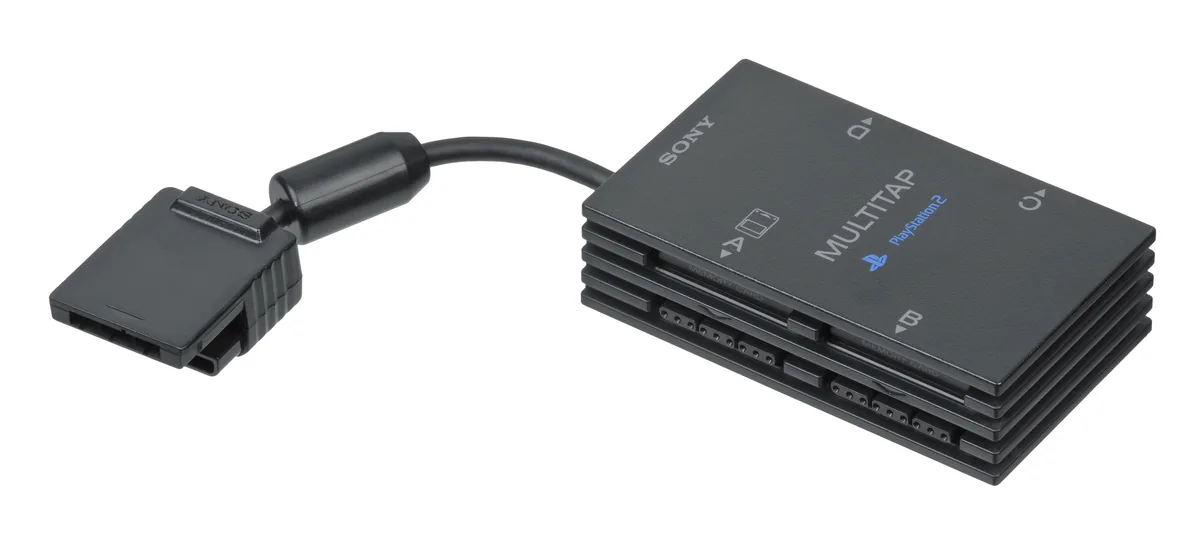

Fat and Slim use different versions
The original larger PlayStation 2 is often called Fat, while compact models are usually advertised as Slim. These are useful group names, but also note your console’s SCPH model number. You can then compare accessory information with a specific device. European units also use European accessory codes. A table for another region may not use the same complete product designations as the set offered to you.
For European PS2 software, SCPH-10090 E is the familiar earlier Multitap for the larger console. Slim uses the later SCPH-70120 E. For European SCPH-90004, for example, Sony explicitly specifies 70120 E and lists 10090 E as incompatible. This is more than a different shell colour: the connection changed. Find the number on the Multitap itself instead of relying solely on Fat or Slim in a sales title.
A fitting accessory does not make a game multiplayer
A Multitap expands the available controller and memory-card connections. It does not give every PS2 game four-player support. The game must recognise the Multitap and offer the desired mode. Check the particular title’s packaging or manual. Also distinguish simultaneous play from taking turns: a player count without further explanation does not always identify the arrangement you can use.
Use controllers supported by your chosen game too. A correct plug connection is only the beginning; required buttons and functions must also be available. Memory-card connections do not mean every participant automatically needs their own card for each session. How data is saved depends on the game. Choose the setup required for your title rather than buying according to the greatest number of visible ports.
How to check a used Multitap
Ask for photographs of the model number and connector. Compare them with your console and do not force a plug that does not fit. During a test, check every intended controller port in a supported PS2 game. Trying just two controllers in a standard two-player menu reveals little about the extra ports. Inspect the cable and any memory-card connections you plan to use. A tidy exterior does not prove full operation.
A PS1 Multitap is a different accessory. PS1 software on PS2 can follow different compatibility rules; do not confuse that with choosing an accessory for PS2 games. Before buying, write down your console model, intended game and Multitap number. These details support a focused comparison. Your evening can then revolve around playing rather than a connector that proves wrong after delivery.