
Game guide · NexWave Games
Which PlayStation 1 games can you play with a Multitap?
PlayStation 1 has two controller ports, but certain games let more than two people play simultaneously. A suitable Multitap makes this possible only when the game supports it. Player numbers can also differ between modes. For an evening with friends, combine the right title, the right mode and the connection described in its manual.
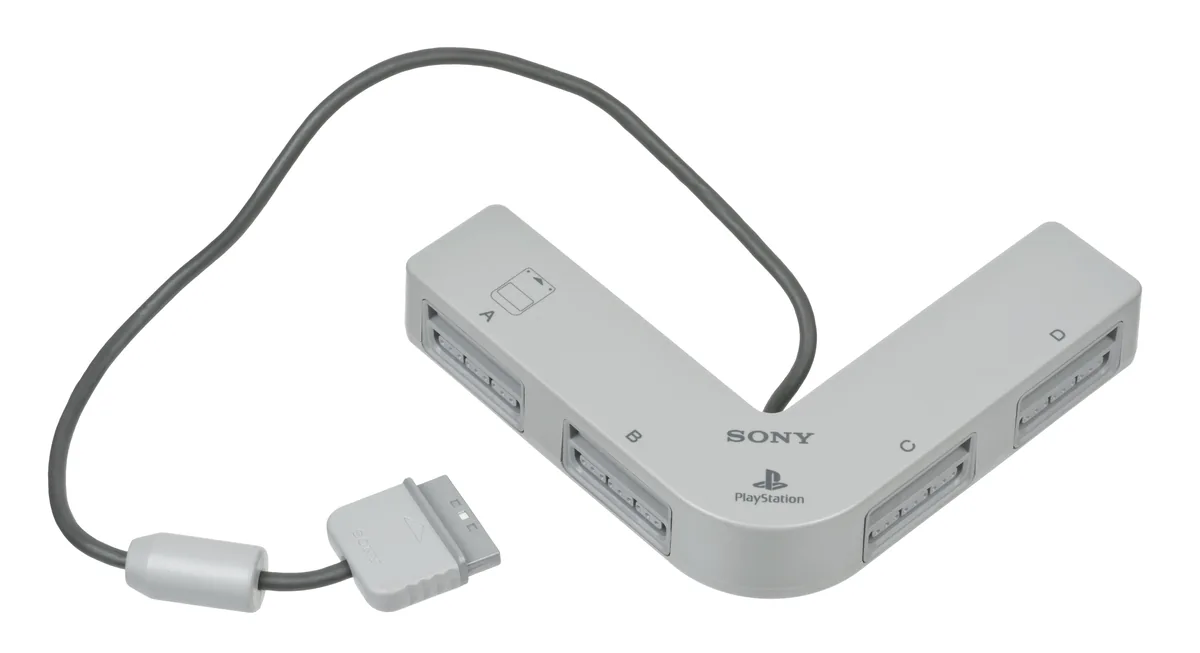

Examples: racing or sharing an arena
Crash Team Racing is a familiar group example: its relevant multiplayer modes support up to four people. On an original PlayStation, more than two controllers require a Multitap. The picture is divided into sections. Adventure does not suddenly become a story completed by four simultaneous players. Select the mode for racing or battling one another instead of merely starting the main menu and expecting four active karts.
Bomberman World offers another arrangement. Its manual specifies up to five participants for the relevant battle modes. You use the arena and bombs to eliminate opponents. Challenge is instead a one-player mode. One case can therefore contain both extensive group options and a separate solo activity. A prominent player count in a listing cannot simply be applied to every part of a game.
The console port sometimes really matters
Bomberman World’s manual describes a specific setup: one controller directly in console port one and four through a Multitap in port two. This illustrates why you should not assume a Multitap always uses the same port. If an extra controller fails to respond, first check the instructions for your game. One title’s required connection can differ from the arrangement you know from another.
For other PS1 games, consult case and manual for Multitap support, simultaneous player numbers and the relevant modes. A football game offering several participants does not automatically allow the same group size in every mode. Also distinguish taking turns from simultaneous control. Not every game labelled for several people automatically requires buying a Multitap.
Prepare the complete playing setup
Use a Multitap suited to your PlayStation setup and intended software. A similarly named PS2 Multitap is not automatically the same purchase. Arrange enough working controllers and test every connection in a supported mode. Seeing only the first two players move in a menu does not fully check a four- or five-person setup. Check that controllers also provide the functions required by the game.
When buying used, check the disc title and included accessories. Crash Team Racing: Nitro-Fueled, for example, is a later remake rather than a PS1 disc for this setup. Check storage separately if you want to save progress. Then select a game to suit the group: racing with individual screen sections or watching a shared arena. Keeping the manual nearby prevents extra players spending the evening staring at an unresponsive controller.