
Accessory guide · NexWave Games
Wii Classic Controller or Classic Controller Pro: which suits you?
You want to play a Wii game using conventional buttons and sticks and find two similar names: Classic Controller and Classic Controller Pro. Both are official Nintendo accessories for more traditional controls. The Pro mainly has a different shape. Before choosing between them, check that your game supports this controller family. The connection alone does not tell you which games work.
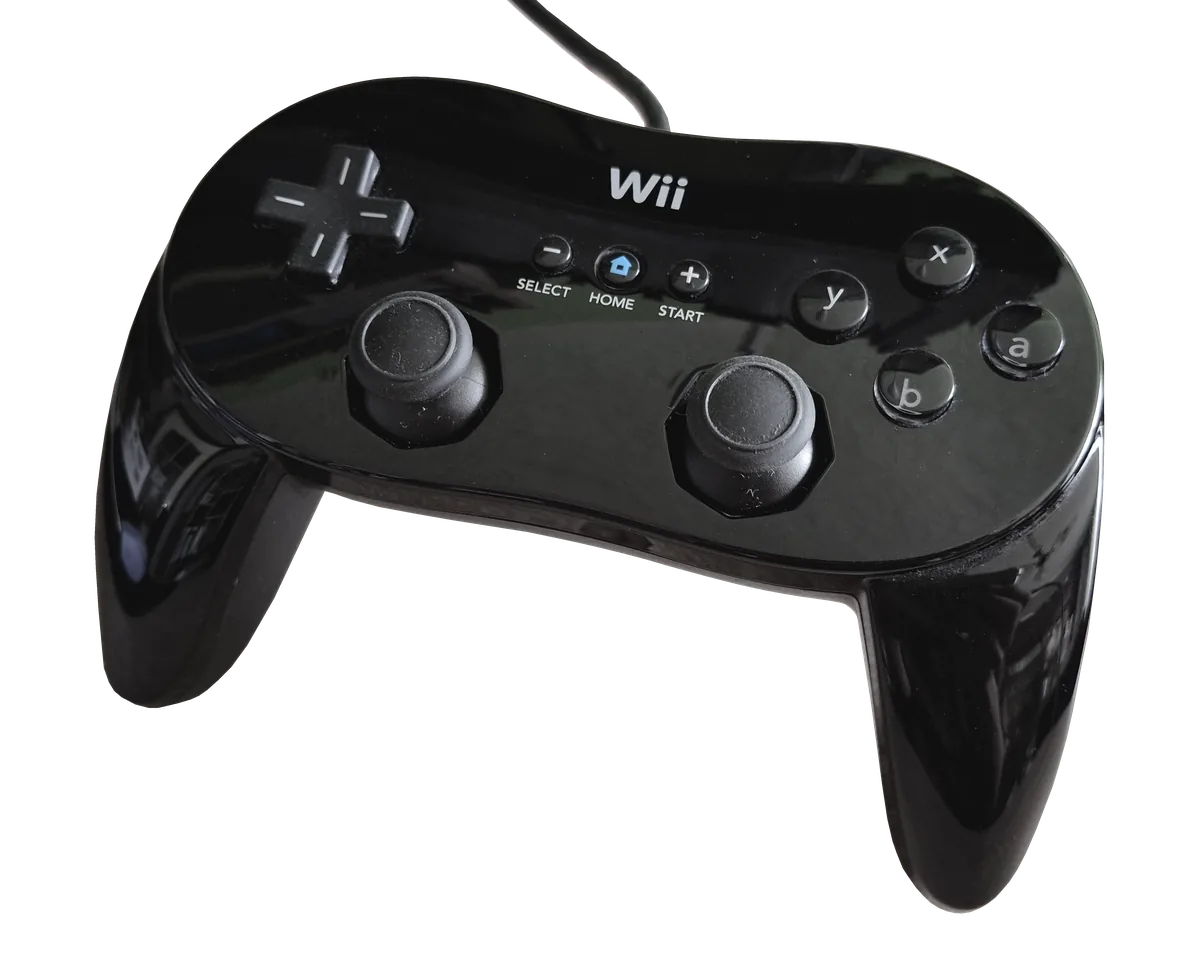

The main difference is how they feel
The original Classic Controller has a fairly flat, compact shape with a directional pad, action buttons and two analogue sticks. Classic Controller Pro adds handgrips, changing how you hold it. Its shoulder-button arrangement also differs. The choice therefore partly concerns hands and posture. Someone who likes a flat controller does not automatically need the Pro just because its name contains an extra word.
If possible, try how your thumbs rest on sticks and buttons and whether you can easily reach the shoulder buttons. That reveals more than dimensions on a product page. Examine clear photographs when buying used. The original Classic Controller carries model number RVL-005; the Pro is designated RVL-005(02). Combine that information with shape and manufacturer markings, since a single inscription cannot prove that every component is original.
Both connect to a Wii Remote
Both Classic Controller models plug their cable into a Wii Remote’s accessory connector. The Wii Remote continues to provide the connection to the console. Neither is therefore a standalone USB controller plugged directly into the Wii. A listing for a Classic Controller alone is not automatically a complete control setup. Check whether you already own a working Wii Remote or whether one is included.
Neither adds Wii MotionPlus, nor does either automatically replace motion controls. A game asking for a Wii Remote and Nunchuk does not acquire the same support merely because you connect a Classic Controller. Wii Sports Resort, for example, retains its own controller requirements. The Pro name does not mean broader control choices in every game either. The software decides which devices can be used.
Check support for each title
Look at packaging, the manual or official game information for Classic Controller support. This matters for Wii games and older Virtual Console titles. Having two sticks is not a general compatibility guarantee. GameCube discs on a compatible Wii also use their own supported controller setup; a Classic Controller is not a direct replacement. Choose your game first and its suitable controller afterwards.
Finally, test the directional pad, both sticks, all action buttons and shoulder buttons in a supported game. Check cable and plug too, since the connection runs through the Wii Remote. Choose the standard Classic Controller if you like its compact shape, or the Pro if the grips and button placement feel better. Confirmed support and a complete connection make this a practical comparison rather than a guess based on a name.