
Accessory guide · NexWave Games
Nintendo 64 Transfer Pak: what can you do with it in Pokémon Stadium?
You see Pokémon Stadium for the Nintendo 64 and remember that you used to have your own Pokémon on the big screen. That didn't happen on its own. You needed a Transfer Pak, plus a matching Game Boy game with a working save. What exactly does that accessory do, and what do you have to buy?
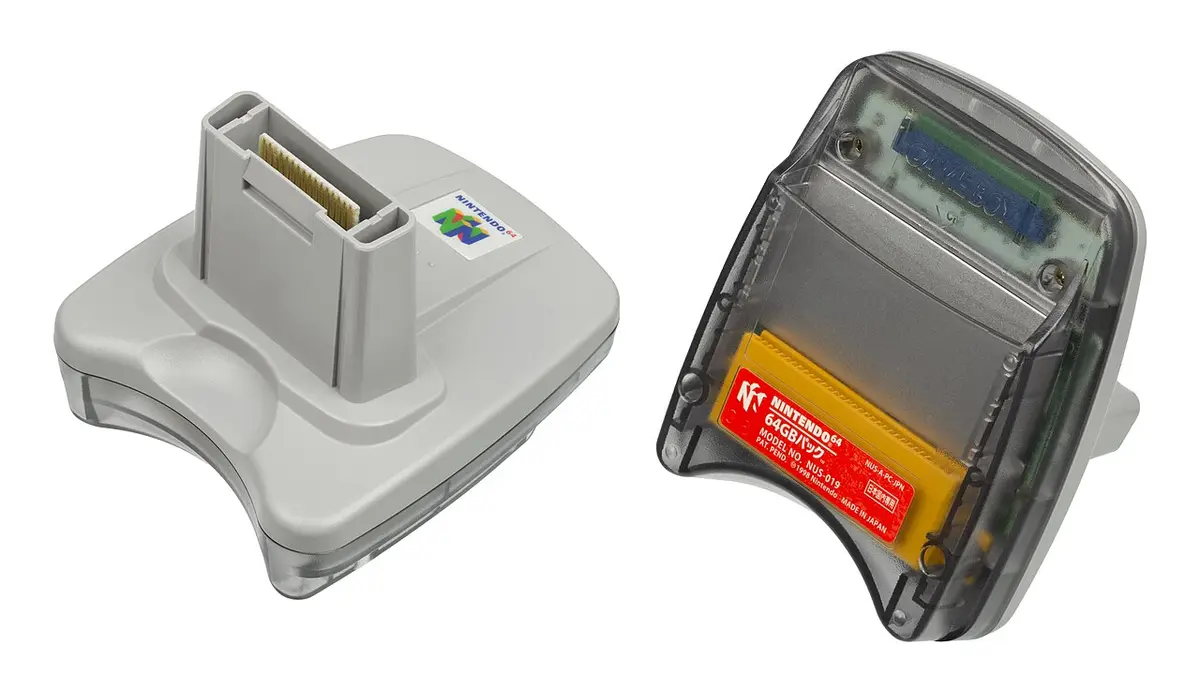

This is how you connect the two game worlds
The Transfer Pak goes under a Nintendo 64 controller in the accessory slot. In the Transfer Pack you place a compatible Game Boy cartridge. Pokémon Stadium can read data from Pokémon Red, Blue or Yellow and use your own trained Pokémon. Nintendo also describes the possibility of playing the Game Boy game via Pokémon Stadium on television. The N64 game and Game Boy cartridge are both still needed.
It's not just a memory card. A Controller Pak is used for some N64 games for storage; a Rumble Pak makes your controller vibrate. The Transfer Pak connects a portable cartridge to a specific N64 game. So don't buy the first grey accessory with the word "Pak" in the title.
Pokémon Stage 1 and 2 are not the same
At the first Pokémon Stadium, Red, Blue and Yellow are the relevant Game Boy editions. Pokémon Stadium 2 also supports the second generation, such as Gold, Silver and Crystal. A cartridge of Pokémon Gold in the first Stadium does not automatically deliver the functions you expect in Stadium 2. Always check both the N64 title and the Game Boy version before buying parts separately.
Nintendo also mentions other combinations with the Transfer Pak, including Mario Golf, Mario Tennis and Mickey "Speedway" USA. The accessory only works where a game supports that link. The tag on the cover or an official compatibility list helps you better than an ad that simply says "Game Boy" games.
The save on the cartridge is important
For your own Pokémon, the Game Boy cartridge must be able to preserve its progress. Some old cartridges use an internal battery that can be empty after many years. Test if you can save in the Game Boy game, turn off the device and check that the save remains after restart. A cartridge that does start but loses its save is disappointing for this purpose.
Also check the contacts of the Transfer Pak and the controller. A loose connection can disconnect while reading. If possible, ask for a demonstration in the game menu with the cartridge you want to use. That's more convincing than just a picture of the accessory on the table.
The Transfer Pak does not magically transfer all data from every Pokémon game. The function depends on the combination of Stadium version, cartridge and available save. A cartridge can start on a Game Boy but cannot be found due to a bad contact in the Pak. Therefore, let the entire chain test together and do not remove the parts while reading.
Your shopping list for the next Pokémon battle
You need a working Nintendo 64, a controller with accessory slot, Pokémon Stadium or Stadium 2, a Transfer Pack and a matching Game Boy cartridge. Start with the game you want to play and then choose the right generation of Pokémon cartridge. If everything works together, your own team members will appear on TV instead of just the pre-selected Pokémon from the game.