
Accessory guide · NexWave Games
Which Buzz controllers do you need for Buzz on the PS2 or PS3?
You will find Buzz!: Quiz TV or an old PS2 quiz game and thinks: fun for an evening with friends. Until when you unpack, you only find four large red buttons. What exactly do you connect it to? At Buzz not only the disc is important, but especially whether the right set of buzzers is complete.
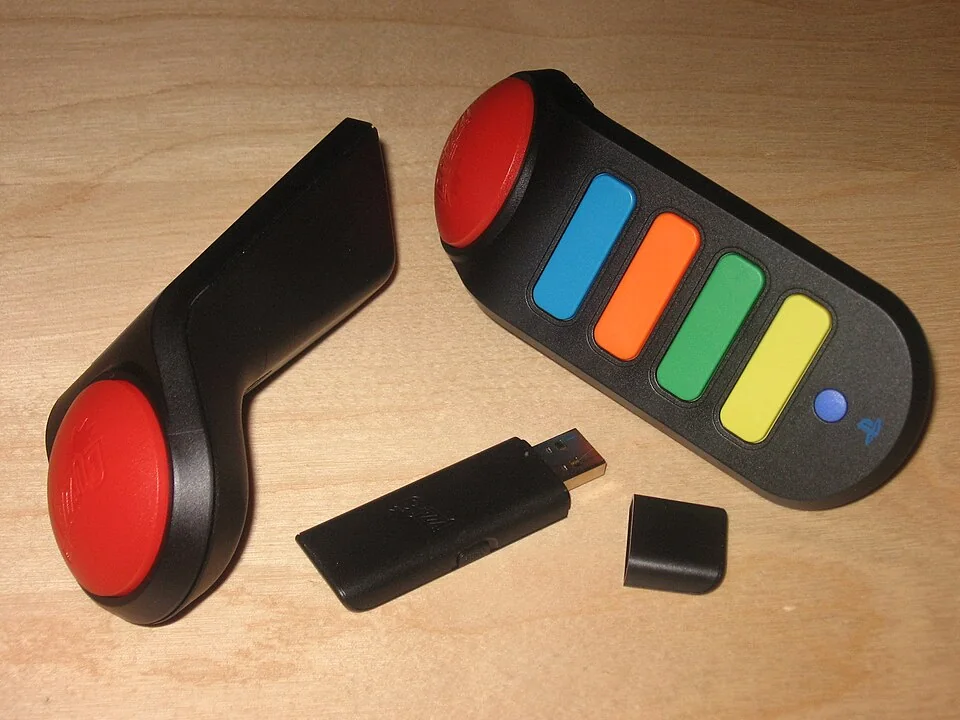

Wired and wireless buzzers
The well-known wired Buzz sets consist of four quiz controllers with a shared USB connection. A wireless set has four loose buzzers and a separate USB receiver. This receiver belongs to the set: without it, you cannot simply log the wireless buttons into the PS3 menu via Bluetooth. For an advertisement, always check if the small receiver is clearly on the picture.
Sony's manual for wireless Buzz buzzers mentions both PlayStation 2 and PlayStation 3. That does not mean that every random quiz game, disc or bundle offers the same options. Check the platform of the specific game, the number of players and the required operation on the package. A PS2 disc does not automatically become a PS3 game because you use the same buzzers.
The receiver is the main loose part
With the wireless version, the receiver goes into a USB port of the console. The four buzzers use batteries and make contact with that receiver. If you only buy the buttons without the USB stick, then an essential part of the set is missing. The original Sony manual describes that one receiver connects up to four wireless buzzers.
Ask for a photo with four buzzers, the receiver and possibly the battery compartment of one buzzer. See if there's any battery leakage on the contacts. A set with five parts on the table gives more clarity than a picture of only the box, which may have ever been complete.
Check the game and the buttons
Start a suitable Buzz game on the intended console and test the red button and all colored response buttons per player. Switch the buzzers so you know if they're responding individually. Test a wireless set with batteries that still have enough voltage; otherwise a working buzzer looks defective. You can also check a wired set for nodding or damage in the cable.
Besides, look at the language of the game. A quiz with questions in English gives a different evening than a Dutch edition, even though the controllers look identical. Second hand bundles may be composed of different countries. If in doubt, ask for a picture of the back of the cover or a short movie from the start menu.
What are you setting up for quiz night?
First choose a Buzz game for your PS2 or PS3. Then find a working set of four buzzers and check the USB receiver and battery compartments for wireless supply. Test every button before guests arrive. Then the discussion at the table is about the right answers, not a forgotten USB stick.